Inbox Sanity reads your new mail, flags the few things that actually need you, and handles the rest the way you would — on rules you wrote in plain English, with a logged reason for every decision and an undo for anything reversible.
macOS 26+ · Gmail or any IMAP/SMTP account
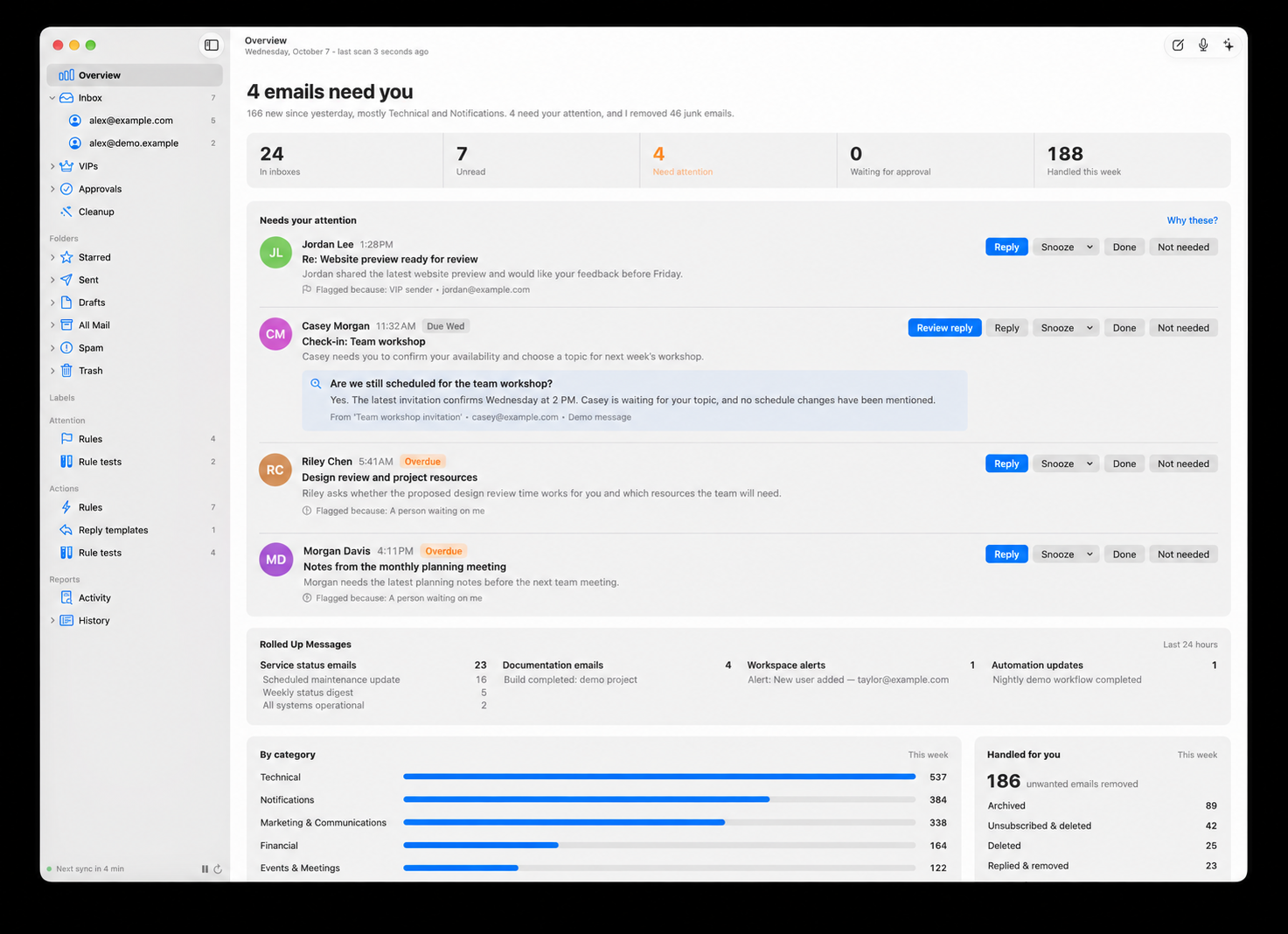
Most tools either sort mail into folders you still have to read, or hand an AI your mailbox and hope. Inbox Sanity does neither — it runs on your rules, and you can read exactly why it did what it did.
Out of 165 new messages, maybe a handful genuinely need you today. The rest is noise wearing a subject line.
Flagged mail is surfaced; everything else is handled the way you would — archived, labeled, unsubscribed, rolled up.
Every decision is logged with its reason and the model's confidence. Disagree? Change the rule. Undo what's reversible.
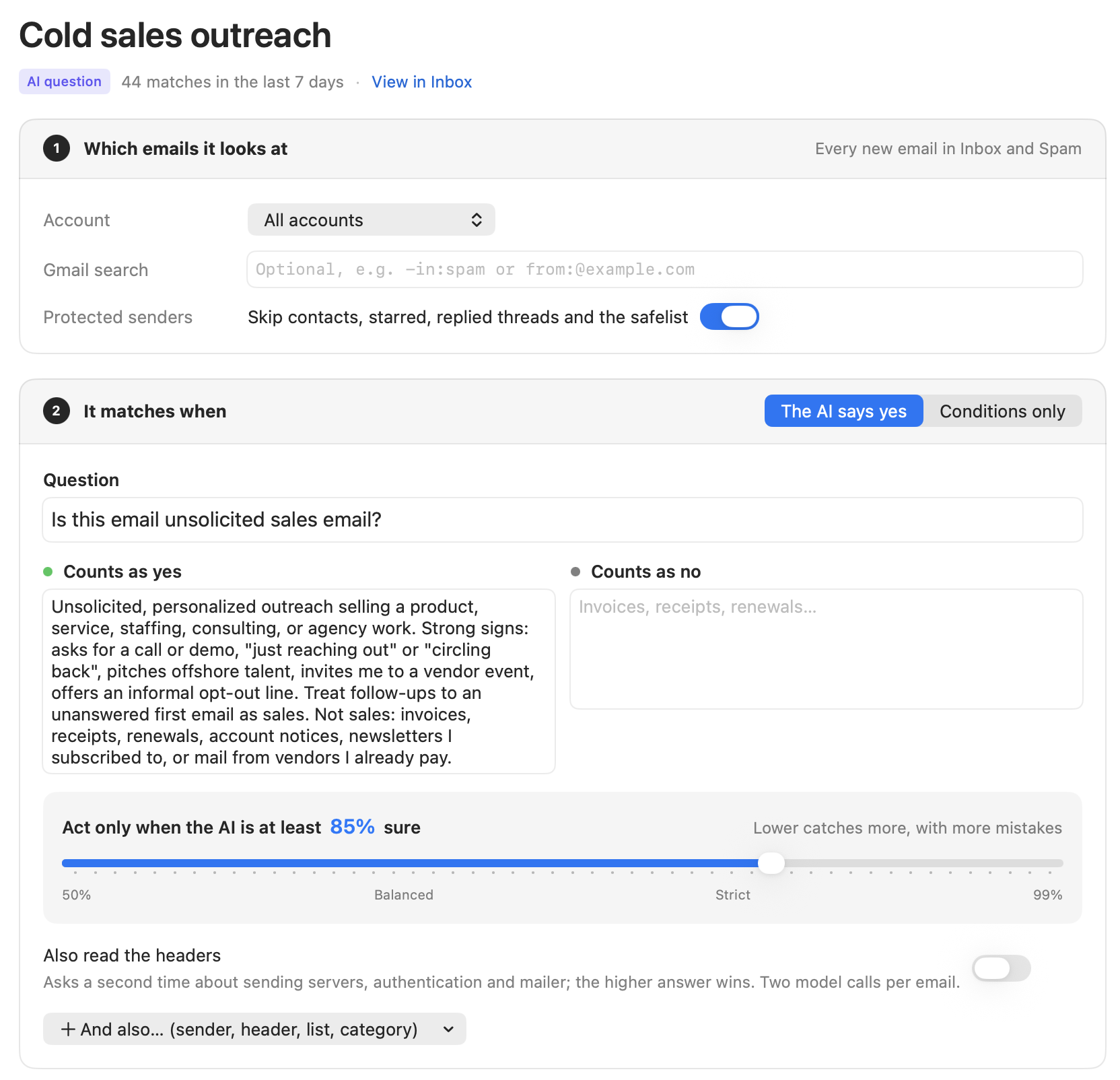
A rule is a yes/no question in plain English. Around it sit deterministic conditions that cost nothing to check — the model only answers the hard part.
Say “your rules,” not “AI.” The model answers the question — you wrote the question.
Every competitor claims the automation. Few can claim the brakes — the approval queue, the undo, the reasons, the rate limits. Inbox Sanity starts by asking permission for everything and earns automation one rule at a time.
New rules — and anything the Assistant proposes — start in approval mode. Matches queue up in Approvals with the email, the rule, the confidence, and the plan, until you confirm.
Take it back. A sent reply and a delivered unsubscribe can't be undone — and the app is honest about which is which rather than pretending otherwise.
Replies and destructive actions are capped. If a limit trips, every rule falls back to waiting for approval instead of charging ahead at speed.
Before any rule runs: Contacts, threads you've replied to, starred mail, your Mac's address book, and anything you safelist. Add “Stripe” and it recognizes mail sent on Stripe's behalf, not just stripe.com.
A chat pane that works on your actual mailbox — reads attachments and PDFs, searches your mail, and writes rules for you. Say what you want in a sentence; it fills in the search, the question, the threshold, and the actions. You review it and save it. Saved rules go into approval mode, never straight to automatic.
On-device speech with Parakeet & Kokoro on the Neural Engine — or OpenAI's Realtime API if you'd rather. Nothing it drafts leaves your Mac without a confirmation.
“Retailer promos, but keep order confirmations.” It writes a filter, shows the matches, and the whole bulk pass can be undone. Never touches Spam or Trash.
It reads your sent mail and builds a short style guide — greeting, sign-off, length, formality. Quotes and forwards stripped first, so it learns your words.
Connect your own HTTP MCP servers and the Assistant uses their tools — each with an ask / allow / deny policy, defaulted from read-only vs. destructive.
Classification is pluggable, and the on-device options are first-class. Any rule can name its own model — the expensive one handles judgment calls, the local one handles volume.
A rule whose model isn't set up is skipped — it never quietly falls back to a different one, because a confidence threshold tuned for one model means nothing on another.
No servers of ours sit in the middle. The app talks only to your mail provider and to whichever model you chose.
Everything lives in a local SQLite database. Message bodies are never stored — only the snippet. (The one exception is a rule test you deliberately saved.)
Run it fully offline from the model's point of view. Apple Intelligence, MLX, Ollama, and on-device speech mean nothing has to leave the machine.
API keys live in the macOS Keychain, never in the database. The app is sandboxed, signed, and notarized.
Encrypted mail is decrypted in memory and never written to disk. Off-device models don't see decrypted text unless you explicitly turn that on.
The composer won't send a reply to an encrypted email in the clear unless you turned encryption off yourself — and refuses to encrypt when a key is missing.
Secret keys go in the Keychain; your contacts' public keys are discovered via WKD and Autocrypt, so encrypted mail just works.
Join the early access list. We'll let you know the moment Inbox Sanity is ready for your Mac — no noise, which would rather defeat the point.
macOS 26+ · Apple silicon · Gmail or any IMAP/SMTP account · Privacy Policy